

That is where Turbologo steps in. Founded in 2018, Turbologo is an AI-powered online logo maker and brand identity platform designed to take you from a simple business name to a complete, ready-to-launch visual identity in under 15 minutes.
In this comprehensive 2026 review, we take a deep dive into how Turbologo works, its standout social media and brand kit features, real pricing tiers, pros and cons, and how it compares to competitors like Canva and Looka.
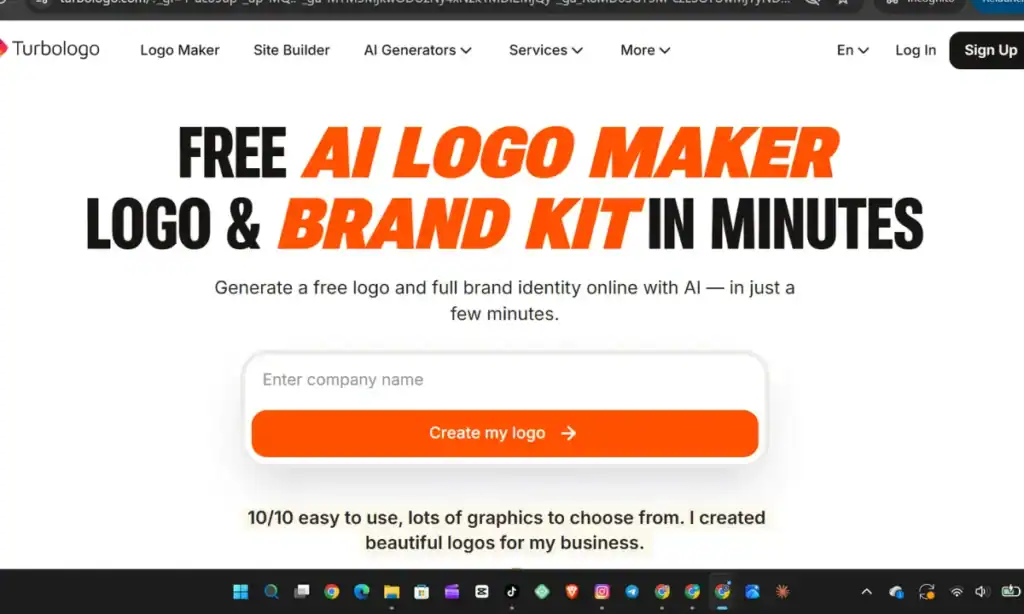
What Is Turbologo?
Turbologo is a browser-based AI design suite built specifically for entrepreneurs, startups, content creators, and small business owners who want professional branding without needing graphic design skills. Rather than relying solely on static templates that thousands of other businesses have already used, Turbologo’s machine learning engine generates custom combinations of icons, fonts, layouts, and color schemes tailored to your business name, slogan, and industry.
Beyond its core AI logo generator, the platform has expanded into a full branding ecosystem that includes:
- A Complete Brand Kit (brand guidelines, color codes, font pairings, and logo variations)
- Social Media Post & Cover Generators (pre-sized graphics for Instagram, Facebook, TikTok, YouTube, and LinkedIn)
- Print & Stationery Makers (business cards, letterheads, envelopes, flyers, and invoices)
- AI Tools (Business Name Generator, AI Website Builder, AI Design Generator, and AI Video tools)
Key Features & Social Media Capabilities
1. AI-Powered Logo Generation & Intuitive Editor
Getting started on Turbologo requires zero upfront payment or technical training. You enter your company name, optional tagline, and industry, then select a few color palettes and icon styles you gravitate toward. Within seconds, the AI generates dozens of tailored logo concepts.
Once you pick a concept you like, Turbologo opens an interactive, browser-based editor. Here, you have granular control over:
- Layouts: Switch effortlessly between stacked, horizontal, badge, or icon-only arrangements.
- Typography: Adjust font families, letter spacing, size, and alignment.
- Icons & Shapes: Swap symbols from a massive searchable library, layer multiple icons, or adjust color gradients.
- Live Mockups: As you edit, a real-time preview panel shows exactly how your logo will look on t-shirts, storefront signage, mobile screens, and business cards.
2. Built-In Social Media Kit & Post Generator
For creators and businesses focusing heavily on social media marketing, consistent visual branding is what turns casual scrollers into recognizable followers. One of Turbologo’s biggest strengths is how seamlessly it translates your logo into ready-to-use social media assets.
Instead of manually resizing your logo or guessing which hex color codes match your brand, Turbologo automatically extracts your logo’s palette and applies it across:
- Profile Avatars & Banners: Properly scaled profile icons and cover headers for Facebook, YouTube, LinkedIn, and X/Twitter.
- Branded Social Media Posts & Stories: Templates tailored for promotions, discounts, grand openings, product launches, and customer reviews on Instagram, Facebook, and TikTok.
- Consistent Feed Aesthetics: Because every post, story, and cover pulls directly from your core logo assets, your social feeds maintain a cohesive, agency-grade aesthetic without extra effort.
3. Comprehensive Brand Identity Kit
If you opt for a full brand kit, Turbologo compiles your visual identity into a structured package. This includes a multi-page Brand Book detailing your exact HEX and RGB color values, typography hierarchy, and usage rules, alongside print-ready templates for business cards, email signatures, letterheads, and promotional flyers.
Step-by-Step: How to Create Your Brand on Turbologo
- Enter Your Brand Details: Visit Turbologo and input your business name, optional slogan, and industry category.
- Choose Colors & Icons: Select up to three color palettes and search for relevant icons or symbols that reflect your niche.
- Browse & Favorite Concepts: Scroll through the AI-generated variations and click the heart icon on designs that catch your eye.
- Customize in the Editor: Fine-tune fonts, spacing, icon placement, and color shades while checking live mockups.
- Download Your Package: Preview everything for free, and only pay when you are completely satisfied and ready to download your high-resolution and vector files.
Turbologo Pricing Breakdown (2026)
One of the most refreshing aspects of Turbologo is its one-time payment model. While many competing platforms lock brand assets behind recurring monthly or annual subscriptions, Turbologo lets you design for free and purchase your files with a single upfront payment:
| Plan Tier | Typical Price (One-Time) | What’s Included | Best For |
| Lite | ~$15.99 – $19.99 (varies by region/promo) | 1 high-resolution raster logo file (PNG/JPEG, standard background) | Quick digital placeholders or testing a concept |
| Standard | ~$15.99 – $34.99 | High-res PNGs with transparent backgrounds, vector files (SVG, PDF), full commercial ownership, and post-purchase editing window | Most small businesses, websites, and merchandise printing |
| Business | ~$31.99 – $64.99+ | Everything in Standard plus the full Brand Kit: social media avatars/covers, business cards, letterheads, email signatures, brand book, and font names | Brands launching across social media, web, and print simultaneously |
(Note: Turbologo frequently runs promotional discounts on its site, so exact checkout pricing may vary slightly depending on active offers and currency.)
Pro Tip: Skip the entry-level Lite plan. Because it lacks a transparent background and scalable vector files (SVG), you will run into limitations the moment you try to place your logo over a colored website header, social media banner, or printed packaging. Upgrading to Standard or Business gives you infinite scalability without pixelation.
Pros and Cons of Turbologo
Pros
- Zero Risk Before Buying: You can generate unlimited logo variations and customize layouts for free before spending a cent.
- One-Time Payment Structure: No forced recurring subscriptions just to keep using your brand assets.
- Scalable Vector Exports: Standard and Business tiers include SVG and PDF files ready for everything from tiny app favicons to large storefront banners.
- Fast Social Media & Print Alignment: Automatically generates matching social media profiles, covers, business cards, and brand books.
- Full Commercial Rights: You retain permanent commercial ownership of your downloaded logo.
Cons
- No Free High-Res Downloads: Designing is free, but exporting usable files requires a paid tier.
- Time-Limited Post-Purchase Editing: Depending on your tier, editing access lasts for a set window (typically 3 months to 1 year), so be sure to download all color variations while your window is active.
- AI Icon Limitations: Like all AI logo generators, icons come from a shared library rather than bespoke hand-drawn illustrations—though heavy customization in the editor helps make your mark distinct.
Turbologo vs. Competitors
- Turbologo vs. Canva: Canva is fantastic for ongoing social media content creation, and it offers a free tier. However, Canva’s logo templates are widely reused, and exporting vector SVG files with transparent backgrounds requires a recurring Canva Pro subscription. Turbologo offers a one-time payment and generates custom icon-text pairings automatically.
- Turbologo vs. Looka: Both platforms offer very similar AI workflows and sleek brand kits. However, Looka’s vector logo package and brand kit subscriptions are noticeably more expensive than Turbologo’s one-time Standard and Business tiers.
Final Verdict: Should You Use Turbologo?
If you are launching a new business, refreshing a social media brand, or building an e-commerce store on a realistic budget, Turbologo is one of the fastest, most cost-effective branding tools available in 2026.
Its intuitive AI editor removes the steep learning curve of professional design software, while its one-time pricing and built-in social media and brand kit assets save hours of manual formatting. You can test it out risk-free in minutes: head over to Turbologo, type in your brand name, and see what the AI creates for your business.

Muse runs BikoMarketing, a publication focused on helping small
business owners and solo founders choose the right marketing tools,
build their tech stack, and grow without overspending on software
they don’t need.
Coverage includes email marketing platforms, marketing automation,
SaaS reviews, and tech recommendations — written for people who
want real answers, not marketing fluff.
📩 contact@bikomarketing24@gmail.com