
Choosing the right hosting provider is one of the most important decisions you will make for your website. Your hosting can influence website speed, reliability, security, user experience and even your ability to handle increasing traffic.
Cloudways offers a different experience from conventional shared-hosting companies. It provides a managed cloud hosting platform that allows businesses, bloggers, developers and agencies to use powerful cloud infrastructure without managing every technical server task independently.
Instead of placing hundreds of websites on a basic shared server, Cloudways gives customers a more isolated environment with dedicated server resources. It also adds an accessible control panel, security features, performance optimization and customer support.
But is Cloudways worth the price, and is it appropriate for beginners?
This Cloudways review for 2026 examines its important features, performance technology, security, pricing, customer support, advantages and disadvantages.
Ready to explore managed cloud hosting?
Start your Cloudways free trial here.

What Is Cloudways?
Cloudways is a managed cloud hosting platform designed to simplify the process of hosting websites on cloud infrastructure.
Managing a cloud server directly can require experience with operating systems, security configurations, software updates, caching and command-line tools. Cloudways handles many of these responsibilities while providing customers with a visual management dashboard.
Cloudways is especially popular for hosting:
- WordPress websites
- WooCommerce stores
- Digital-agency websites
- Business websites
- Blogs and online publications
- PHP applications
- Laravel applications
- Magento stores
- Client websites
The platform offers two main managed WordPress products: Cloudways Flexible for customizable cloud servers and Cloudways Autonomous for a more automated, autoscaling WordPress experience.
This review primarily focuses on Cloudways Flexible, the service most individual website owners and small businesses are likely to consider.
How Does Cloudways Work?
Traditional hosting companies normally own or lease the servers used for their hosting plans. Cloudways operates as a management layer between customers and supported cloud infrastructure.
When creating an account, you choose your application, server configuration and available cloud provider. Cloudways then deploys and manages the server through its platform.
You can use the dashboard to:
- Launch websites and applications
- Manage servers
- Install SSL certificates
- Create staging environments
- Configure backups
- Monitor server resources
- Clone applications
- Scale server capacity
- Manage team access
- Connect domains
- Access applications through SFTP or SSH
This structure provides more control and scalability than basic shared hosting without requiring customers to build and maintain an unmanaged cloud server.
Cloudways Performance and Speed Features
Website speed is one of Cloudways’ strongest selling points. The platform combines cloud infrastructure with several server-level performance technologies.
Dedicated Server Resources
Unlike conventional shared hosting, Cloudways provides a dedicated cloud-server environment. Your server resources are not divided using the same crowded structure commonly associated with entry-level shared hosting.
However, multiple applications placed on your own Cloudways server will share that server’s available resources. The number of websites you should install depends on their traffic, storage and processing requirements.
Built-In Caching
Cloudways includes several caching technologies, such as:
- Varnish
- Memcached
- Redis
- Nginx
- PHP-FPM
- Object Cache Pro on eligible plans
These technologies can reduce repeated server work and improve page delivery when configured correctly.
WordPress installations also include access to Breeze, Cloudways’ caching and performance plugin. Website owners should avoid running multiple plugins that perform the same caching functions because overlapping optimization settings can cause conflicts.
Cloudflare Enterprise Add-On
Cloudways offers a Cloudflare Enterprise CDN add-on with features such as edge caching, intelligent routing and additional security capabilities.
This is an optional paid service rather than a standard free feature on every plan. Its value will depend on your visitors’ locations, website traffic and existing CDN setup.
Vertical Scaling
If your website’s traffic or resource requirements increase, Cloudways allows you to upgrade the server’s RAM, storage and processing capacity.
This makes Cloudways suitable for websites that expect to grow. Scaling down may have different limitations depending on the chosen infrastructure, so check the platform’s conditions before increasing your server.
WordPress Hosting Features
Cloudways provides several useful tools for WordPress website owners.
One-Click WordPress Installation
You can launch a new WordPress website from the Cloudways dashboard without manually creating databases or installing WordPress files.
Free Website Migration
Cloudways currently advertises one expert-assisted website migration for new customers. WordPress users can also use the Cloudways WordPress Migrator plugin for self-service migrations.
Always create an independent backup before moving an established website between hosting providers.
Staging Environments
A staging environment allows you to test changes without immediately affecting your live website.
This is useful when:
- Updating WordPress
- Changing themes
- Testing plugins
- Editing website code
- Redesigning important pages
- Troubleshooting compatibility problems
After verifying that the changes work correctly, you can push them to the live website.
Website Cloning
Cloudways provides application and server-cloning options. Agencies and developers can use these tools to duplicate website configurations or create development copies.
Unlimited Applications
Cloudways does not impose a fixed application limit on Flexible servers. Nevertheless, every installed website consumes server resources. “Unlimited applications” does not mean unlimited processing power, traffic or storage.
Cloudways Security Features
Website security requires several layers. Cloudways includes tools intended to protect both servers and applications.
Its available security features include:
- Dedicated server-level firewalls
- Free SSL certificates
- Two-factor authentication
- Bot protection
- Brute-force protection
- IP allowlisting
- Automated backups
- Application isolation
- Operating-system security patches
- WordPress vulnerability scanning
- Server and application monitoring
- Automatic server healing
- Optional malware protection
A free SSL certificate can be installed through the dashboard to enable HTTPS. Automated backups and restoration points also help customers recover from certain website problems.
Cloudways manages server-level security, but customers must still protect their applications. You remain responsible for strong passwords, appropriate user permissions and regularly maintained themes and plugins.
Backups and Monitoring
Cloudways allows customers to configure automated server backups and backup frequency. On-demand application backups can also be created before making major website changes.
Offsite backup storage may incur a separate usage charge. Review the current pricing terms so you understand the complete monthly cost.
The dashboard offers server and application monitoring for metrics such as:
- CPU usage
- Available memory
- Disk usage
- Incoming traffic
- Database activity
- Application performance
This information helps website owners recognize when an application requires optimization or when a server needs additional resources.
Cloudways Pricing
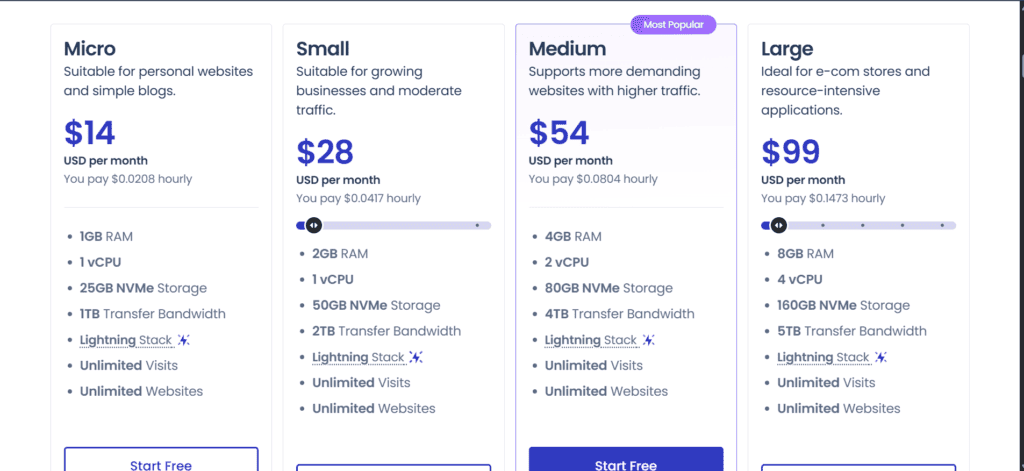
Cloudways uses pay-as-you-go billing. Instead of purchasing several years of hosting in advance, customers are generally charged according to the resources and time used.
Cloudways’ general pricing page currently advertises managed servers starting at approximately $11 per month, while its dedicated WordPress-hosting page lists DigitalOcean WordPress plans from approximately $14 per month. Provider, region, server type and promotions can affect the final price.
Cloudways also offers infrastructure options involving providers such as:
- DigitalOcean
- Vultr
- Linode
- Amazon Web Services
- Google Cloud
AWS and Google Cloud configurations normally cost more and may use different storage and bandwidth billing structures.
Potential additional charges can include:
- Offsite backup storage
- Cloudflare Enterprise CDN
- Additional website migrations
- Transactional or mailbox email services
- Malware protection
- SafeUpdates
- Advanced support
- Additional bandwidth usage
- Applicable taxes
Because pricing changes, confirm the exact resources and total cost displayed inside Cloudways before launching a server.
See the available plans and current promotion:
Explore Cloudways pricing and start free.
Does Cloudways Offer a Free Trial?
Cloudways currently advertises a three-day free trial for eligible services, with no credit card required to activate it.
This gives you an opportunity to explore the dashboard, launch a test WordPress installation and examine the platform before selecting a paid plan.
Some infrastructure configurations, including certain AWS and Google Cloud options, may have different trial conditions. Verify availability during registration.
Cloudways Customer Support
Standard Cloudways plans include 24/7/365 support through live chat and a ticketing system.
Support can assist with platform and server-related questions. However, standard hosting support may not cover every third-party WordPress theme, plugin or custom-code issue.
Cloudways offers paid Advanced and Premium Support options for customers requiring quicker responses or more detailed assistance. Most individual bloggers and smaller websites should begin with standard support before purchasing an upgrade.
The knowledge base also includes instructions for server deployment, domain connections, migrations, SSL installation and application management.
Cloudways Email Hosting
Cloudways does not include conventional email inbox hosting as a standard feature.
Customers who need an address such as contact@yourdomain.com can use a separate email service. Cloudways offers Rackspace Email as a paid add-on, but you can also connect another compatible email provider.
Transactional website emails—such as password resets, contact-form messages and WooCommerce notifications—may require a dedicated email-delivery service or SMTP configuration.
This separation can improve email delivery, but beginners should include it when calculating the full cost.
Cloudways Pros and Cons
Pros
- Managed cloud server environment
- Pay-as-you-go billing
- No long-term hosting contract required
- Built-in server caching
- Free SSL certificates
- Automated backup options
- Staging and cloning tools
- Vertical server scaling
- Multiple cloud-infrastructure choices
- 24/7 customer support
- One free managed migration advertised
- Free WordPress migration plugin
- Three-day trial without a credit card
- Suitable for WordPress and WooCommerce
- Team and client-management capabilities
Cons
- More expensive than entry-level shared hosting
- No free domain name
- Email inboxes are not included
- Some important features are paid add-ons
- The dashboard may require time for beginners to learn
- Advanced plugin and theme assistance can cost extra
- Offsite backups may create additional charges
- Customers still need to maintain WordPress
- Pricing varies between infrastructure providers and regions
- A three-day trial is shorter than many users may prefer
Cloudways vs Traditional Shared Hosting
Cloudways and shared hosting target different requirements.
| Feature | Cloudways | Typical shared hosting |
|---|---|---|
| Server environment | Managed cloud server | Shared server |
| Billing | Usage-based monthly billing | Usually prepaid |
| Scaling | Flexible server upgrades | Plan-based limitations |
| Email hosting | Usually separate | Frequently included |
| Domain registration | Not included | Sometimes included |
| Staging | Available | Plan dependent |
| Technical learning curve | Moderate | Low |
| Ideal customer | Growing or performance-focused sites | New and small websites |
Shared hosting may be sufficient for a new personal website with low traffic and a limited budget. Cloudways becomes more attractive when performance, flexibility and server control are greater priorities.
Who Should Use Cloudways?
Cloudways may be a good choice for:
- WordPress bloggers expecting traffic growth
- Small and medium-sized businesses
- WooCommerce store owners
- Digital agencies managing client websites
- Freelance web designers
- Developers
- Publishers with several websites
- Membership and online-course websites
- Businesses moving away from slow shared hosting
- Users wanting cloud infrastructure without complete server administration
Who Should Avoid Cloudways?
Cloudways may not be suitable for:
- Beginners who want the simplest possible hosting service
- People needing a free domain and email in one package
- Very small websites with minimal performance needs
- Customers who want unlimited support for third-party plugins
- Users who prefer a traditional cPanel interface
- Anyone unwilling to monitor resource usage and additional costs
For BikoMarketing and similar content websites, Cloudways may make sense once traffic and resource demands justify moving beyond entry-level shared hosting.
Is Cloudways Good for WooCommerce?
Cloudways can be a strong option for WooCommerce because online stores generally require more server resources than simple blogs.
Useful WooCommerce features include:
- Dedicated server resources
- Redis and object-caching options
- Staging environments
- Automated backups
- Free SSL
- Vertical scaling
- Application monitoring
- Cloudflare Enterprise integration
- Multiple data-center locations
Hosting cannot correct every performance problem. Store speed also depends on the theme, plugins, database, product images and third-party scripts.
Is Cloudways Beginner-Friendly?
Cloudways is easier than managing an unmanaged cloud server, but it is not quite as simple as basic shared hosting.
New users may need to learn concepts such as:
- Servers and applications
- DNS records
- SSL installation
- Backup frequency
- Caching
- PHP versions
- Vertical scaling
- Server resource monitoring
The interface and support documentation make these tasks manageable, but users should expect a short learning period.
Final Verdict: Is Cloudways Worth It in 2026?
Cloudways offers a compelling balance between managed hosting convenience and cloud-server flexibility.
Its strongest features include dedicated resources, built-in caching, staging, automated backups, free SSL, vertical scaling and access to several cloud-infrastructure options. Pay-as-you-go billing also removes the need to purchase a long hosting contract upfront.
However, Cloudways is not the cheapest or simplest hosting option. Email hosting, premium CDN services, malware removal and some advanced assistance can require additional payments. Beginners should review the complete cost rather than focusing only on the advertised starting price.
Cloudways is best suited to growing WordPress websites, WooCommerce stores, businesses, developers and digital agencies that need better performance and flexibility than ordinary shared hosting typically provides.
If your website is beginning to outgrow entry-level hosting—or you want more control without managing a server alone—Cloudways deserves serious consideration.
Test Cloudways before committing to a paid plan.
Launch a website, explore the dashboard and evaluate its performance during the available trial.
Start your Cloudways free trial today.
Frequently Asked Questions
Is Cloudways a web-hosting company?
Cloudways is a managed cloud hosting platform. It combines cloud infrastructure with server management, security tools, caching, monitoring and customer support.
How much does Cloudways cost?
Its general pricing page advertises managed servers from approximately $11 per month, while its WordPress page lists plans from approximately $14 per month. Pricing depends on the provider, server, region and selected add-ons.
Does Cloudways offer a free trial?
Cloudways currently advertises a three-day free trial without requiring a credit card for eligible plans.
Does Cloudways include a free domain?
No. You must register your domain separately and connect it to your Cloudways application.
Does Cloudways include email hosting?
Email inbox hosting is not included as a standard feature. Rackspace Email is available as a paid add-on, or you can use another email provider.
Can I host multiple WordPress websites?
Cloudways Flexible allows multiple applications on a server, but every website shares that server’s resources. Choose an appropriate server size based on total traffic and workload.
Is Cloudways suitable for beginners?
It can be suitable for motivated beginners, although it has a greater learning curve than basic shared hosting.
Can Cloudways migrate my WordPress website?
Cloudways currently advertises one free expert-assisted migration. It also provides a WordPress migration plugin for self-service transfers.
Cloudways’ current official materials confirm pay-as-you-go billing, 24/7 support, managed backups, security tools and a no-credit-card free trial. Pricing varies by product and configuration, so verify the checkout total before purchase. Cloudways pricing, Cloudways WordPress hosting

Muse runs BikoMarketing, a publication focused on helping small
business owners and solo founders choose the right marketing tools,
build their tech stack, and grow without overspending on software
they don’t need.
Coverage includes email marketing platforms, marketing automation,
SaaS reviews, and tech recommendations — written for people who
want real answers, not marketing fluff.
📩 contact@bikomarketing24@gmail.com