

Quick Verdict
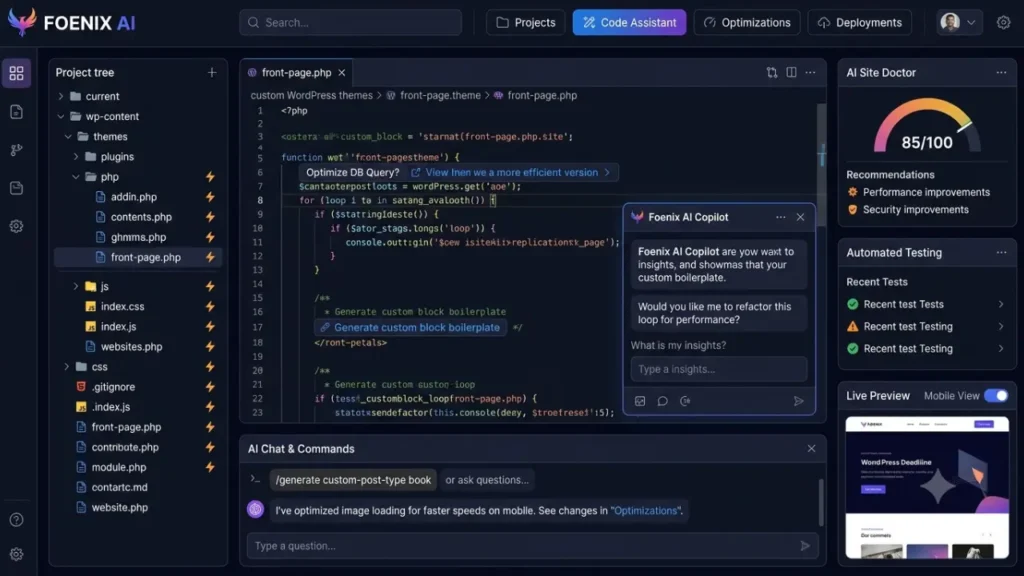
Foenix AI is a specialized AI assistant built exclusively for WordPress — not a general-purpose productivity tool. It automates content creation, meta tag optimization, custom code, and site health monitoring through a pipeline of AI agents that understand WordPress architecture natively.
Overall rating: 4.1/5
Best for: WordPress developers, agencies managing multiple client sites, and content publishers running SEO-heavy WordPress operations who want to speed up routine work.
Skip if: You need a general AI writing tool (Kit or Notion AI work better), you run non-WordPress websites, or you cannot commit to consistent backups before each use.
One critical warning upfront: <cite index=”12-1″>Foenix.ai openly states the product is in early development and cannot guarantee your site will remain intact during operation.</cite> This honesty is refreshing — but it means you need a testing environment, not your live production site.

Try Foenix AI →
Why Every WordPress Publisher Needs to Pay Attention Right Now
Running a WordPress site in 2026 takes more time than it should.
You write the content. You optimize the meta tags. You edit the featured images. You update the theme. You debug the plugin conflict that appeared out of nowhere. You check site speed. You review your SEO scores.
Then you do it all again next week for the next post.
Foenix AI enters a specific gap in the WordPress ecosystem — the space between generic AI writing tools (which do not understand WordPress) and expensive WordPress developers (who understand it perfectly but cost $75–$150 per hour).
Instead of switching between ChatGPT, your WordPress dashboard, your code editor, and your SEO plugin, Foenix runs inside WordPress itself as an AI agent that reads your site’s structure and executes tasks in the language a WordPress developer would use.
This review covers what Foenix AI actually does, what it does well, where it fails, and whether it deserves a place in your workflow.
What is Foenix AI?
<cite index=”12-1″>Foenix AI is an AI-powered developer assistant built specifically for WordPress that automates routine tasks and speeds up work 5–10x through natural language commands.</cite> It is not a plugin that adds a chatbot to your site. It is a full AI development environment that understands WordPress the way an experienced developer does.
The core positioning is straightforward: turn WordPress from a manual content management system into an AI-augmented platform where you describe what you want in plain language and the system executes it — creating pages, writing posts, updating meta tags, generating alt text, building custom code, or monitoring site health.
<cite index=”13-1″>Foenix uses a pipeline of four AI agents — Orchestrator, Architect, Coder, and Automation — that work together on each task, with the ability to select different AI models per agent depending on how much power (and credit cost) you want to allocate.</cite>
The company’s target audience: WordPress developers, agencies, content publishers, and site owners who work in WordPress consistently and want to eliminate the manual overhead of routine tasks.
The founding context: Foenix.ai is a newer entrant in the WordPress AI space. Specific founder information and company background details are not extensively publicly available at the time of this review.
Key Features of Foenix AI
Native WordPress Content Creation
Foenix creates and updates content directly inside your WordPress installation. <cite index=”12-1″>The AI generates pages, posts, products, menus, block sections, meta tags, and alt texts while understanding your existing content structure — meaning it does not require you to manually copy and paste output between ChatGPT and WordPress.</cite>
This eliminates the switching cost that eats hours from every publisher’s week.
Deep WordPress Architecture Understanding
This is where Foenix separates itself from generic AI writing tools. <cite index=”12-1″>The AI understands how themes, child themes, hooks, custom post types (CPT), Advanced Custom Fields (ACF), taxonomies, and templates work — and it operates strictly by WordPress rules.</cite>
For non-developers, this means: when you ask it to create a custom post type or add a hook, it does not generate generic PHP that breaks your theme. It generates WordPress-native code that respects your existing setup.
Clean Code Generation
<cite index=”12-1″>Foenix writes code the way an experienced WordPress developer does — clean, maintainable, and compatible with your theme and plugins.</cite> This matters because most AI-generated code from general tools like ChatGPT works in isolation but breaks when dropped into a real WordPress environment.
Edits Mode for Safety
<cite index=”12-1″>In Edits mode, Foenix shows what it plans to change before executing anything. You confirm the changes — then the AI executes the task automatically.</cite>
This preview layer prevents the “AI just deleted my homepage” nightmare that has become common with autonomous AI tools.
24/7 Site Monitoring Agents
<cite index=”12-1″>Foenix’s autonomous agents find errors, check SEO, monitor speed, and watch site health continuously — without you having to manually run diagnostics.</cite>
This runs in the background, alerting you to issues before they become problems visible to your visitors.
Configurable AI Model Pipeline
<cite index=”13-1″>Each of the four agents (Orchestrator, Architect, Coder, Automation) can be configured to use different AI models in Settings — Personality — AI Pipeline Models. More powerful models produce better results but consume more credits, while weaker models reduce cost but may affect output quality.</cite>
For cost-conscious operators, this granular control matters.
SEO Article Generation with Location Targeting
<cite index=”13-1″>When tasks involve web search — for example writing an SEO article or researching competitors — Foenix uses the SERP location and language configured in Settings, so your content targets the right geographic market.</cite>
This is one of the few AI writing tools that lets you specify SERP location for market-specific SEO research.
How Foenix AI Works
The workflow follows six steps:
Step 1 — Install and connect. You install the Foenix plugin on your WordPress site and connect it to your Foenix dashboard. <cite index=”12-1″>Foenix works with both new and existing sites — it reads your current theme, plugins, and content structure automatically upon connection.</cite>
Step 2 — Open a session. <cite index=”13-1″>You open your Foenix dashboard, click a connected site, and start a new session. Each session is tied to a single site and stays separate per site.</cite>
Step 3 — Type your request. You describe what you want in natural language: “Write a 2,000-word blog post about email marketing for solo entrepreneurs” or “Add a custom post type for testimonials with fields for name, quote, and photo.”
Step 4 — Attach context if needed. <cite index=”13-1″>In any session you can attach additional context to your message — reference documents, existing pages, or specific requirements.</cite>
Step 5 — Foenix executes. The four-agent pipeline analyzes your request, plans the execution, writes the necessary code or content, and applies it to your site. <cite index=”13-1″>Simple queries respond instantly. Complex tasks — like building a plugin or theme — may take several minutes.</cite>
Step 6 — Review and confirm. <cite index=”13-1″>You can close the browser tab while a session runs — it continues working in the background. After actions that modify your site, a Rollback button may appear (though this feature is currently in active development and may not always be available).</cite>
Foenix AI Pricing
Foenix uses a credit-based pricing structure — different AI models consume different amounts of credits per task.
Honest transparency note: Full detailed pricing tiers with specific dollar amounts are not extensively publicly available at the time of this review. Foenix operates on a credit consumption model where more powerful AI models (used for complex tasks) cost more credits than simpler ones.
For current, accurate pricing details:
Check Foenix AI’s latest pricing →
Prices and plan structures may change as the product develops.
Pros and Cons
| Pros | Cons |
|---|---|
| Deep WordPress integration — understands themes, hooks, CPT, ACF | Explicitly in early development per official documentation |
| Native code generation compatible with your existing setup | Backup required before every use — real risk of site issues |
| Four-agent pipeline handles complex multi-step tasks | Rollback feature not always available (in active development) |
| Edits mode previews changes before executing | Pricing structure not fully transparent publicly |
| Sessions continue running in the background | Stopping a session mid-execution wastes credits |
| Configurable AI models per agent for cost control | Support primarily via Discord community |
| SERP location targeting for market-specific SEO content | Requires WordPress hosting and minimal WordPress knowledge |
| Site monitoring agents run 24/7 | Not suitable for non-WordPress sites |
| Works with existing sites, not just new builds | Complex tasks can take several minutes to complete |
| Company is honest about product limitations upfront | Newer product without established long-term track record |
Balanced assessment: Foenix AI’s technical approach is solid — the four-agent pipeline and native WordPress understanding solve real problems that generic AI writing tools cannot. But the “early development” self-disclosure means operators need a testing environment and consistent backup routines, not just a spirit of adventure with their live site.
Foenix AI vs Competitors
| Tool | Best For | Strength | Weakness |
|---|---|---|---|
| Foenix AI | WordPress developers and agencies | Native WordPress architecture understanding | Early development stage |
| AI Engine (Meow Apps) | WordPress users wanting AI features inside admin | Established plugin, stable | Less autonomous, more manual |
| GetGenie AI | WordPress content creators | SEO-focused writing inside Gutenberg | Content-only, no code generation |
| Bertha AI | WordPress writers | Simple writing assistant | Limited to text generation |
| Divi AI | Divi theme users | Theme-integrated AI features | Only works with Divi |
| ChatGPT + Manual Copy-Paste | General users | Free, flexible | No WordPress integration, hours of switching |
Where Foenix wins: Comprehensive automation across content, code, and site health — not just writing. Understanding of WordPress-specific concepts that other AI tools miss.
Where competitors win: Established tools like AI Engine have proven track records. GetGenie is better if you only need SEO writing inside Gutenberg. ChatGPT with manual workflow is free (though far slower).
The realistic decision framework: If you already spend more than 5 hours per week on WordPress-related tasks — content, technical maintenance, SEO optimization, or code updates — Foenix AI is worth testing. If you spend under 5 hours per week on WordPress, a simpler tool serves you better.
Who Should Use Foenix AI
WordPress developers working on client sites benefit most. The ability to describe complex customizations in natural language and get WordPress-native code back saves significant billable hours on routine work.
Digital agencies managing multiple client WordPress sites find real value in the multi-site session structure and background execution capabilities.
Content publishers running SEO-heavy WordPress blogs — sites publishing multiple posts weekly — benefit from the writing plus meta tag automation running natively inside WordPress.
Small businesses with WordPress sites who cannot afford a dedicated developer but need occasional custom modifications may find Foenix a middle path — assuming they have technical enough understanding to backup and test properly.
Freelancers and consultants who build WordPress sites for clients can dramatically speed up delivery times using the AI pipeline for routine build tasks.
Bloggers publishing consistently benefit if they publish 2 or more times per week and want to reduce content production and optimization time.
Skip if: You run non-WordPress sites, publish less than once per week, or cannot commit to backing up before every AI-executed change.
Real Use Cases
SEO article publishing: Ask Foenix to write a 2,000-word post targeting a specific keyword with the correct SERP location configured. The AI generates the content, applies meta tags, adds alt text to images, and publishes to draft — all inside WordPress without external tools.
Bulk meta tag optimization: Foenix reviews existing posts missing meta descriptions and generates optimized ones based on the content — potentially saving hours across a large content library.
Custom post type creation: Describe what you need (“testimonials CPT with name, quote, photo, and star rating fields”) and Foenix generates the required PHP and ACF configuration.
Theme customization: Request theme adjustments in natural language rather than editing PHP files manually. Foenix generates and applies WordPress-compliant modifications.
Site health monitoring: The autonomous agents flag broken links, slow-loading pages, missing alt text, or SEO issues before they affect rankings.
Landing page building: Describe the landing page you need and Foenix builds it using your existing theme’s block components rather than requiring a page builder.
Content updates at scale: Bulk update outdated statistics across multiple posts, refresh internal links, or standardize CTA language across your entire site.
Test Foenix AI on your WordPress site →
Performance and User Experience
Speed: <cite index=”13-1″>Response times vary based on task complexity and the AI model selected. Simple queries respond instantly. Complex tasks can run for several minutes — but sessions continue in the background even if you close the browser.</cite>
User interface: The dashboard-based interface is clean and functional. Sessions organize per-site, which prevents confusion when managing multiple WordPress installations.
Learning curve: Requires minimal WordPress knowledge — you need to know your way around the WordPress admin, but PHP knowledge is optional. Non-technical users may struggle with error interpretation when things go wrong.
Reliability considerations: <cite index=”12-1″>Foenix’s own documentation states they cannot guarantee your site will not break during operation and recommend backups before every use, especially in Edits and Agents modes.</cite> This transparency is respectable but demands operational discipline from users.
Support: <cite index=”13-1″>Support is primarily via a Discord community where the team responds. There is no traditional enterprise-grade ticket system mentioned publicly.</cite>
Is Foenix AI Worth It?
The realistic answer depends on your WordPress workload.
High-volume WordPress operators — agencies, publishers, and developers spending 10+ hours weekly on WordPress tasks — will likely find genuine ROI. Time savings from automation compound quickly at that volume.
Moderate WordPress users — bloggers publishing weekly, small business owners maintaining their own sites — should test the platform carefully in a staging environment before relying on it for production work.
Low-volume WordPress users — occasional bloggers, businesses with mostly static sites — will not recover the credit costs and setup overhead. Stick with manual work or use simpler AI writing tools like ChatGPT with copy-paste.
The “early development” self-disclosure by Foenix cannot be ignored. This is a legitimate tool with strong technical foundations, but it is not yet an enterprise-grade solution. Treat it as advanced beta software that happens to be genuinely useful — not as a battle-tested platform you can deploy without safeguards.
Final Verdict
Foenix AI targets a real problem — the time cost of running WordPress at scale — with a technically credible solution. The four-agent pipeline, native WordPress understanding, and honest self-disclosure about limitations mark it as a serious product rather than a hype-driven AI wrapper.
Overall rating: 4.1/5
Buy Foenix AI if:
- You run WordPress-heavy operations (agencies, publishers, developers)
- You have technical understanding to backup and test properly
- You publish consistent content or manage multiple client sites
- You want to compress hours of routine work into minutes
Skip Foenix AI if:
- You run non-WordPress sites
- You cannot commit to consistent backups before AI-executed changes
- You need enterprise-grade support (not Discord-based)
- You publish less than once per week
The product’s honest disclosure about being in early development is a strength — it lets you make an informed decision rather than discovering limitations after purchase. That kind of transparency is rare in AI SaaS and worth respecting.
For the right user — someone spending significant time in WordPress with the discipline to work safely — Foenix AI can genuinely save hours per week. For the wrong user, it will introduce risk without proportionate benefit.
Test it in a staging environment first. Make backups religiously. Scale up usage as you build confidence in the results.
FAQs
What is Foenix AI?
Foenix AI is an AI-powered developer assistant built specifically for WordPress. It automates content creation, code generation, meta tag optimization, and site health monitoring through a pipeline of four AI agents that understand WordPress architecture natively — including themes, hooks, custom post types, and Advanced Custom Fields. Unlike generic AI writing tools, Foenix works directly inside your WordPress installation, eliminating the manual copy-paste workflow between ChatGPT and your admin dashboard.
Is Foenix AI free?
Foenix AI operates on a credit-based pricing structure where different AI models consume different amounts of credits per task. Detailed public pricing tiers are limited at the time of this review. For the most current pricing information and any available free trial options, check the official Foenix AI website directly. Prices and plan structures may change as the product develops.
Is Foenix AI worth it?
Foenix AI is worth it if you spend more than 5–10 hours per week on WordPress-related tasks — content creation, technical maintenance, or site management. High-volume WordPress operators like agencies, publishers, and developers see the strongest ROI. For occasional WordPress users publishing less than weekly, the setup overhead and credit costs may not justify the investment. Test the platform in a staging environment before relying on it for production work.
Who should use Foenix AI?
Foenix AI is best for WordPress developers, digital agencies managing multiple client sites, content publishers running SEO-heavy WordPress blogs, and freelancers building WordPress sites for clients. Small business owners with technical understanding may also benefit. The tool is not suitable for non-WordPress site owners or users who cannot commit to consistent backup routines before executing AI-driven changes on their sites.
How does Foenix AI work?
You install the Foenix plugin on your WordPress site and connect it to your Foenix dashboard. Open a session tied to a specific site, describe what you want in natural language, and Foenix’s four AI agents (Orchestrator, Architect, Coder, Automation) plan and execute the task. In Edits mode, you preview changes before they execute. Sessions continue in the background even if you close the browser. Complex tasks may take several minutes.
Is Foenix AI safe to use?
Foenix AI includes safety features like Edits mode preview and a Rollback button after site-modifying actions. However, Foenix’s own documentation openly states they cannot guarantee your site will not break during operation and strongly recommend backups before every use — especially in Edits and Agents modes. The Rollback feature is in active development and may not always be available. Treat Foenix as advanced beta software requiring operational discipline.

Muse runs BikoMarketing, a publication focused on helping small
business owners and solo founders choose the right marketing tools,
build their tech stack, and grow without overspending on software
they don’t need.
Coverage includes email marketing platforms, marketing automation,
SaaS reviews, and tech recommendations — written for people who
want real answers, not marketing fluff.
📩 contact@bikomarketing24@gmail.com